

What it does for you
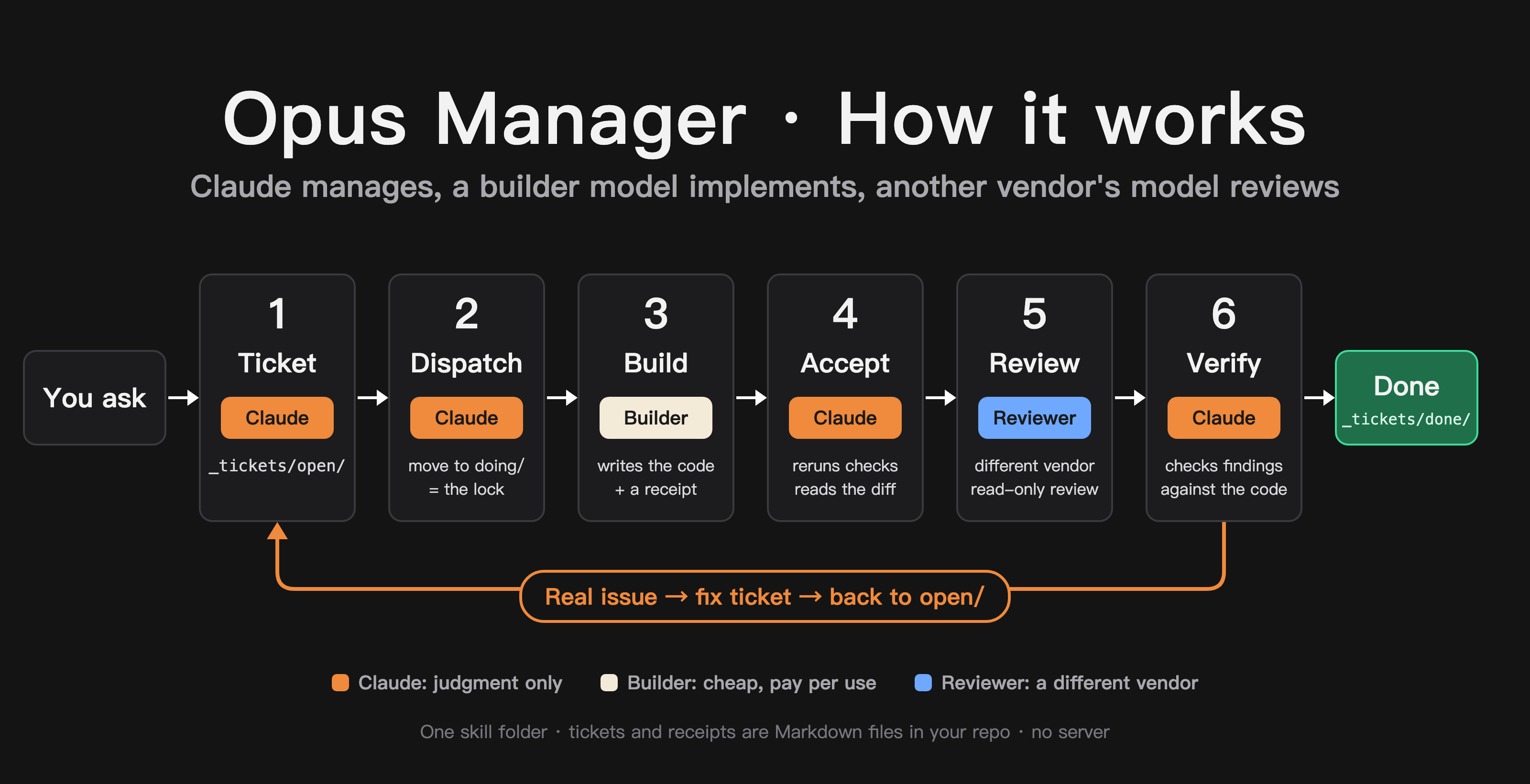
Tell Claude what you want done and leave. It asks its questions before you go, then works down the list on its own: hands out each task, checks the result, gets it reviewed, sends fixes back, moves on. Anything it may not decide alone waits in a list for you. One colleague left at 17:30; by 22:28 it had taken 9 tasks all the way through review, release and a live check by itself.
Claude, Opus in particular, is best at judgment: breaking work down, deciding what “done” means, telling a real bug from a false alarm. Most of the quota goes to writing code, and cheaper models can do that part well.
With this skill, Claude’s quota goes to planning, acceptance and verification, while the coding runs on pay-per-use models on your machine. In my words: a $20 Claude Pro plan starts to feel like the $200 Max plan.
Install: the easy way
After downloading, open Claude Code and send it this:
I just downloaded opus-manager into my Downloads folder (it may be a zip or already unzipped into a folder). Please install it as my personal skill and tell me when it's done.Claude finds the file, unzips it and puts it in the right place. When it’s done, quit Claude Code and open it again.
Install: by hand
Skills live in one fixed folder, .claude/skills inside your home folder. The name starts with a dot, so it is hidden by default. Here is how to get there.
Mac
- Double-click the zip to unzip it (Safari usually does this for you). You get a folder called
opus-manager. - Open Finder, press
⌘ Command + ⇧ Shift + G, paste this line and press Return:
~/.claude- Look for a folder called
skills. If there isn’t one, right-click an empty spot → “New Folder” and name itskills. - Open
skillsand drag theopus-managerfolder in.
Windows
- Right-click the zip → “Extract All”. You get a folder called
opus-manager. - Open File Explorer, click the address bar at the top, paste this line and press Enter:
%USERPROFILE%\.claude- Look for a folder called
skills. If there isn’t one, right-click an empty spot → “New” → “Folder” and name itskills. - Open
skillsand drag theopus-managerfolder in.
Open the opus-manager folder once to check: if you see a SKILL.md file, it’s in the right place. Restart Claude Code and you’re done.
How to use it
Open Claude Code in your project and say:
Use tickets: add remember-me to the login page.“Manage this” or “hand it off to other models” also work. The first time, Claude asks you a few things one at a time: who writes the code, who reviews it, and whether workers may edit files without asking. Then it runs a small trial ticket. Claude does not make privacy, cost or permission decisions for you.
One tip: once you hand it over, let it run. Cutting in mid-task makes Claude stop and verify what you said, which costs more quota.
Status
- macOS: I use the full workflow every day.
- Windows: one user confirmed installation and tool discovery work. A full ticket run is not confirmed yet.
- Linux: expected to work, not tested by me yet.